Crisis Averted...
I need to dig through some old financial stuff to see if I really owe a medical provider what looks to be a copay they say we didn’t pay. No biggie, I’ve got all those details in my personal finance tracker.
Except, the appointment with questionable missing payment was 16 months ago and I migrated from now longer supported Moneywell to GNUCash for tracking a few months ago. When I did the migration, I only brought the last year of data; so, the data I want isn’t in the current tracker. Ugh.
I did export all of the data from the older tracker (geez, 14+ years!) to an xlsx file before I mothballed it. Let me go grab that file. Ok, that’s on my Google Drive (as is data for my current tracker.)
Ok, hmm, where’s that folder? Hmm, I’m pretty sure its ~/Finance, but there’s
no folder there. Ok, I gotta be having a senior moment. Let me fire up GNUCash
and see where its been putting its file. Yeah, its in the same directory.
GNUCash says, uh, where’s that file go?
Hmm, wat?
There’s definitely no directory ~/Finance in my mounted Google Drive. Lets
check the browser view. Yeah, not there either. Heart rate increasing. Lets
check trash. Hmm, there’s some gnucash datafiles in there (the way GNUCash
works its always deleteing and recreating files) but there’s no Finance
directory in deleted files list.
Panic setting in, I wonder if the goofing around with Google Drive on my laptop recently might have trashed something. Files look the same on that device and when it was mounted I only messed with 1 other directory. Hopefully, not related.
Back to the Google Drive web interface. I restored the latest .gnucash datafile.
I didn’t pay attention to where it restored it too. I thought if ~/Finance
was mistakenly deleted, the restore would put the directory back. Found the
file with search and immediately downloaded it before anything else went off
the rails. Renamed off the timestamp and confirmed that it was indeed a
serviceable recent copy of my GNUCash data. Phew.
Back to the Google Drive web interface again. Isn’t there a place where I can get a log of changes? Stabbing around a bit I found it. Open the details pane on the right and change the tab to Activity. I didn’t have much going on in recent history, so it didn’t take long to find the real problem…
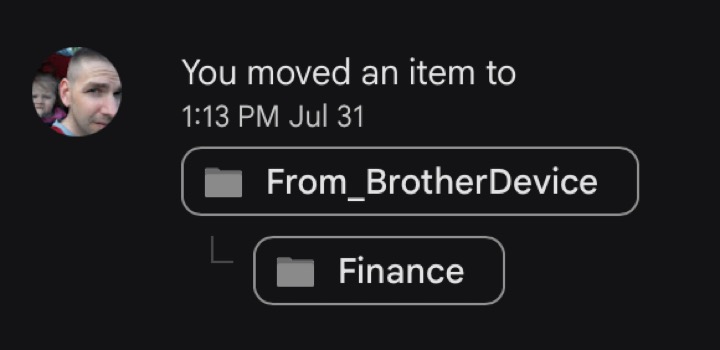
Turns out I accidentally moved the Finance directory into another folder. 😖
I guess it was in the browser interface. I checked the directory its errant
home and confirmed that all the contents were still there and then moved it
back to the root directory. Everything seems back to normal.
With the crisis averted (medical billing investigation still going), I ponder if my Google Drive folder is getting picked up by my local backup program. My Google Drive is mounted all the time, but I’m not sure if backup program walks into the Google Drive mount.
Its been on my todo list to migrate off of Google Drive for a while using some work-a-like system that runs on my Synology NAS. Guess I should really punch that up on the list.
UPDATE: It was a legit charge after all that. Sigh.